Note
Click here to download the full example code
Running the scoreboard model
This example shows how to apply the
ScoreboardModel to an
ArgusII implant.
The scoreboard model is a standard baseline model of retinal prosthesis stimulation, which assumes that electrical stimulation leads to the percept of focal dots of light, centered over the visual field location associated with the stimulated retinal field location \((x_{stim}, y_{stim})\), whose spatial intensity decays with a Gaussian profile [Hayes2003], [Thompson2003]:
where \(\rho\) is the spatial decay constant.
Important
As pointed out by [Beyeler2019], the scoreboard model does not well account for percepts generated by epiretinal implants, where incidental stimulation of retinal nerve fiber bundles leads to elongated, ‘streaky’ percepts.
In that case, use AxonMapModel instead.
The scoreboard model can be instantiated and run in three simple steps.
1. Creating the model
The first step is to instantiate the
ScoreboardModel class by calling its
constructor method.
The most important parameter to set is rho from the above equation (here
set to 100 micrometers):
from pulse2percept.models import ScoreboardModel
model = ScoreboardModel(rho=100)
Parameters you don’t specify will take on default values. You can inspect all current model parameters as follows:
print(model)
Out:
ScoreboardModel(engine='joblib', grid_type='rectangular',
                n_jobs=-1, rho=100, scheduler='threading',
                thresh_percept=0.6065306597126334,
                verbose=True, xrange=(-20, 20),
                xystep=0.25, yrange=(-15, 15))
This reveals a number of other parameters to set, such as:
xrange,yrange: the extent of the visual field to be simulated, specified as a range of x and y coordinates (in degrees of visual angle, or dva). For example, we are currently sampling x values between -20 dva and +20dva, and y values between -15 dva and +15 dva.xystep: The resolution (in dva) at which to sample the visual field. For example, we are currently sampling at 0.25 dva in both x and y direction.thresh_percept: You can also define a brightness threshold, below which the predicted output brightness will be zero. It is currently set to1/sqrt(e), because that will make the radius of the predicted percept equal torho.
In addition, you can choose the parallelization back end used to speed up simulations:
scheduler:- ‘threading’: a scheduler backed by a thread pool
- ‘multiprocessing’: a scheduler backed by a process pool
To change parameter values, either pass them directly to the constructor above or set them by hand, like this:
model.engine = 'serial'
Then build the model. This is a necessary step before you can actually use the model to predict a percept, as it performs a number of expensive setup computations (e.g., building the spatial reference frame, calculating electric potentials):
model.build()
Out:
ScoreboardModel(engine='serial', grid_type='rectangular',
                n_jobs=-1, rho=100, scheduler='threading',
                thresh_percept=0.6065306597126334,
                verbose=True, xrange=(-20, 20),
                xystep=0.25, yrange=(-15, 15))
Note
You need to build a model only once. After that, you can apply any number of stimuli – or even apply the model to different implants – without having to rebuild (which takes time).
2. Assigning a stimulus
The second step is to specify a visual prosthesis from the
implants module.
In the following, we will create an
ArgusII implant. By default, the implant
will be centered over the fovea (at x=0, y=0) and aligned with the horizontal
meridian (rot=0):
The easiest way to assign a stimulus to the implant is to pass a NumPy array that specifies the current amplitude to be applied to every electrode in the implant.
For example, the following sends 10 microamps to all 60 electrodes of the implant:
import numpy as np
implant.stim = 10 * np.ones(60)
Note
Some models can handle stimuli that have both a spatial and a temporal component. the scoreboard model cannot.
3. Predicting the percept
The third step is to apply the model to predict the percept resulting from the specified stimulus. Note that this may take some time on your machine:
The resulting percept is stored in a NumPy array whose dimensions correspond
to the values specified by xrange, yrange, and xystep.
The percept can be plotted using Matplotlib:
import matplotlib.pyplot as plt
plt.imshow(percept, cmap='gray')
plt.xticks(np.linspace(0, percept.shape[1], num=5),
           np.linspace(*model.xrange, num=5))
plt.xlabel('x (dva)')
plt.yticks(np.linspace(0, percept.shape[0], num=5),
           np.linspace(*model.yrange, num=5))
plt.ylabel('y (dva)')
plt.title('Predicted percept')
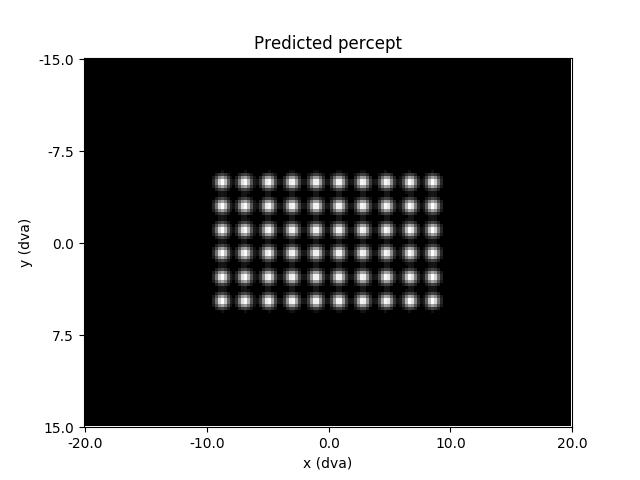
Out:
Text(0.5, 1.0, 'Predicted percept')
Total running time of the script: ( 0 minutes 4.197 seconds)